
Business license tax is a mandatory levy imposed on enterprises and household businesses immediately after registration. Declaring this tax correctly and on time keeps your company compliant, helps you avoid penalties, and ensures smooth day-to-day operations. This article provides a detailed, step-by-step guide to declaring business license tax in Vietnam accurately and efficiently.
- What Is a Business License Tax Declaration?
- Entities Required to Declare and Pay Business License Tax
- How to Declare Business License Tax Online (Latest Guide)
- Guide to Paying Business License Tax Online
- Declaring and Paying Business License Tax Directly at the Tax Office
- Key Points When Declaring and Paying Business License Tax
What Is a Business License Tax Declaration?
Definition of Business License Tax Declaration
A business license tax declaration is the process by which an enterprise or household business reports the annual business license tax payable to the tax authority. This is a mandatory financial obligation that allows the government to manage state budget revenue and ensures transparency in commercial activity.
Role and Significance of Business License Tax
Business license tax provides the government with a stable source of revenue from enterprises and household businesses. Timely declaration and payment help companies stay compliant with the law, avoid administrative penalties, and maintain lawful business operations.
Who Is Required to Declare Business License Tax?
- Enterprises and companies established under Vietnamese law
- Individual household businesses earning revenue from production or trading activities
- Branches and representative offices that operate independently
Latest Updates on Business License Tax
Under Decree 22/2020/NĐ-CP, newly established enterprises are exempt from business license tax during their first year of operation. Branches and representative offices set up in the same year are also exempt. After the first year, however, companies must declare and pay the tax on time to avoid penalties.

Entities Required to Declare and Pay Business License Tax
Enterprises and Household Businesses Required to Declare
All enterprises, household businesses, and organizations engaged in commercial activities must declare business license tax in accordance with legal regulations. This ensures every economic entity meets its responsibility to contribute to the national budget.
Cases Exempt from Business License Tax
Certain entities are exempt from business license tax in order to support new enterprises and small-scale operations. Exemptions include:
- Newly established enterprises in their first year of operation, counted from the date of issuance of the business registration certificate.
- Household businesses with annual revenue below VND 100 million.
- Public educational institutions, public hospitals, and non-profit organizations operating in accordance with the law.
Deadlines for Declaring and Paying Business License Tax
Enterprises and household businesses should keep these deadlines in mind to avoid unnecessary penalties:
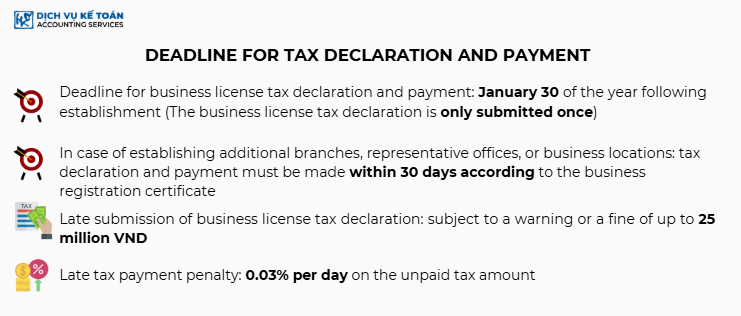
- Newly established enterprises: Must declare and pay business license tax within 30 days from the date of issuance of the business registration certificate.
- Active enterprises: Must complete the declaration and payment of business license tax no later than January 30 each year.
- Household businesses: Depending on local regulations, household businesses will be notified each year of the declaration timeline.
Business License Tax Rates by Entity
The business license tax amount is calculated based on charter capital or annual revenue. Under the latest regulations:
- Enterprises with charter capital over VND 10 billion: VND 3 million per year
- Enterprises with charter capital of VND 10 billion or less: VND 2 million per year
- Branches, representative offices, and business locations: VND 1 million per year
Household Businesses:
- Annual revenue over VND 500 million: VND 1 million per year
- Annual revenue from VND 300–500 million: VND 500,000 per year
- Annual revenue from VND 100–300 million: VND 300,000 per year
Declaring and paying business license tax on time not only ensures legal compliance but also helps your company avoid unnecessary penalties. If you have any questions about the process, we recommend contacting your local tax authority for detailed guidance.
Learn more: 10 CASES EXEMPT FROM BUSINESS LICENSE TAX
How to Declare Business License Tax Online (Latest Guide)
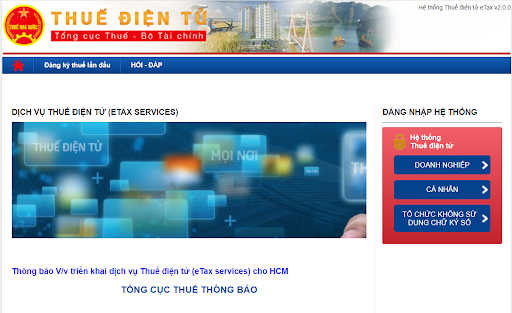
Step 1: Log In to the Electronic Tax Declaration System
Go to thuedientu.gdt.gov.vn and log in using your enterprise account.
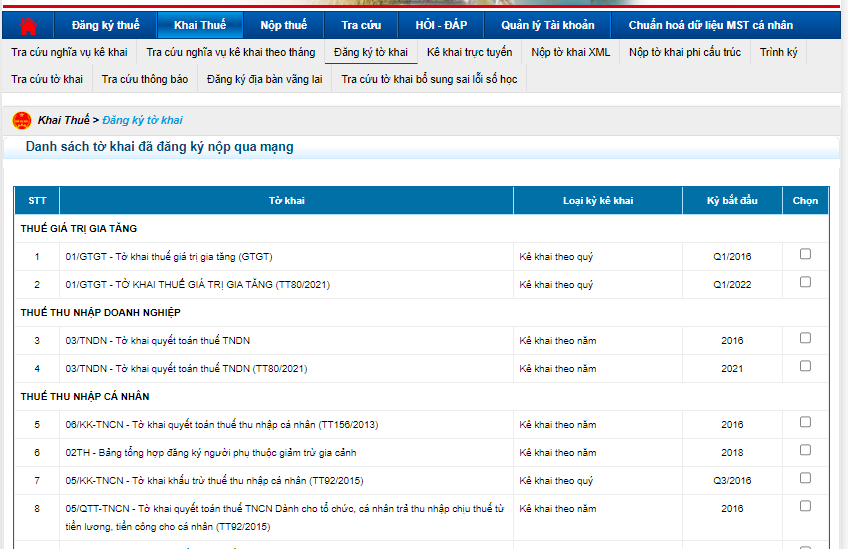
Step 2: Select the Business License Tax Declaration Form
From the main dashboard, open the “Register Declaration Form” section and select the business license tax form that matches your business type.
Step 3: Fill In the Information and Submit the Declaration
Install the HTKK software provided by the General Department of Taxation to support the declaration process.
Enter all required business information and the amount of business license tax payable. Review every field carefully before exporting the XML file and uploading it to the electronic tax system.
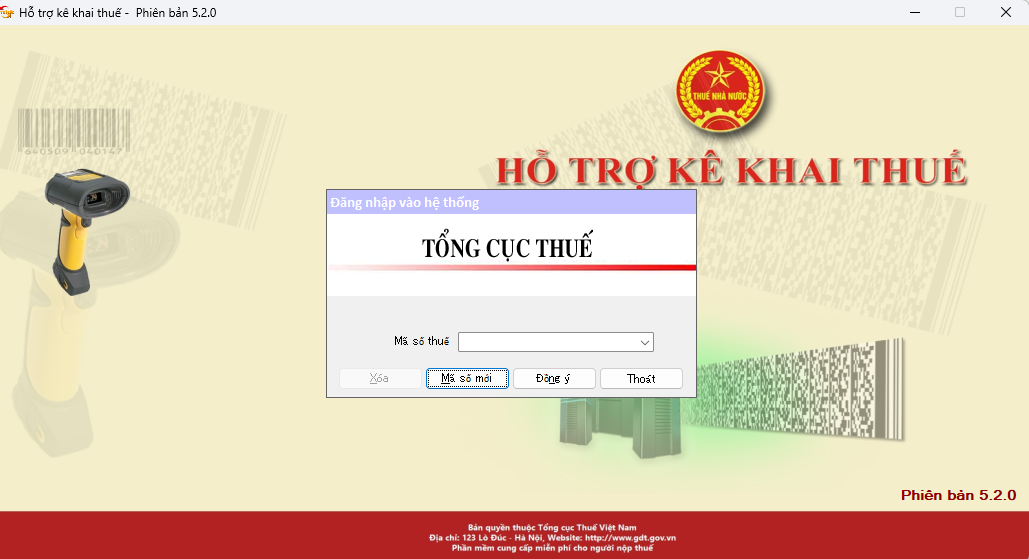
Step 4: Digitally Sign and Submit the Declaration Online
Use your digital signature to authenticate the declaration, then submit it through the system to complete the filing process.
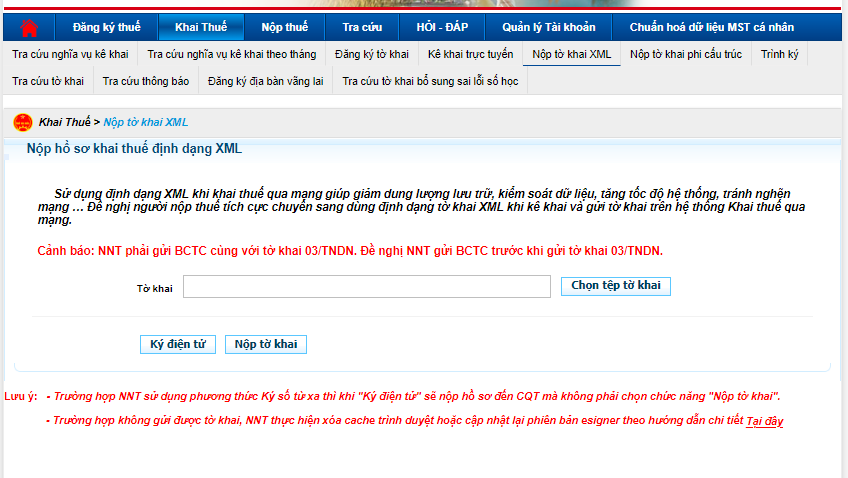
After submitting, you can monitor the processing status on the electronic tax system to confirm that the declaration has been accepted.
Guide to Paying Business License Tax Online
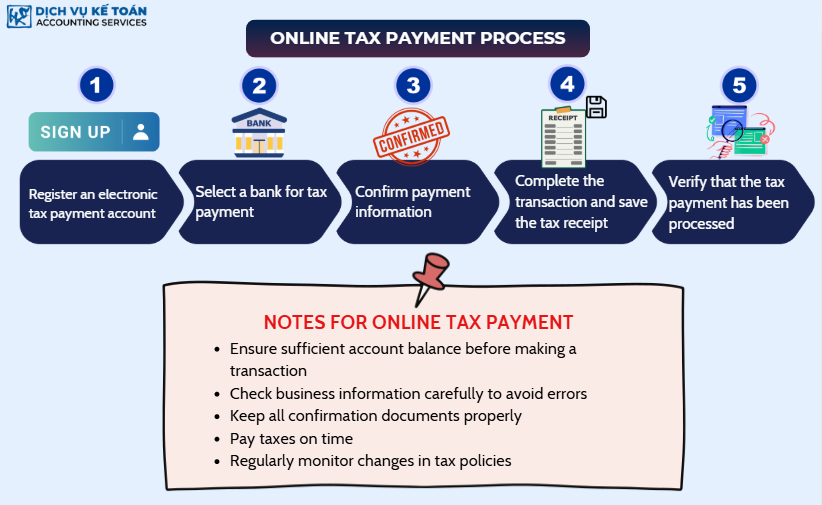
Register for an Electronic Tax Payment Account
Enterprises must register for an electronic tax payment account on the official website of the General Department of Taxation. This account streamlines tax declaration and online payment, saving time and effort, and can also be used to fulfill other tax obligations.
Choose a Bank for Tax Payment
After registering, link your company’s bank account to the electronic tax system in order to make payments. Choose from the list of supported banks to ensure smooth transactions. Selecting the right bank helps keep payment processing fast and accurate.
Confirm Payment Information
Enter the tax amount payable based on the declaration you have already submitted. Review and confirm the information carefully to avoid transaction errors. Correct any mistakes before proceeding so that you do not need to request refunds or adjustments later.
Complete the Transaction and Save the Tax Receipt
After entering the payment information, confirm the transaction to finalize the tax payment. The system will issue an electronic receipt confirming the amount paid. Save this receipt as proof of payment for future reference, especially in the event of audits or tax finalization.
Check Confirmation of Tax Payment
Once payment is complete, log in to the electronic tax system to verify the tax payment status. If any errors occur, contact the tax authority promptly for support. Verifying the payment status ensures that your tax obligations are met on time and helps you avoid unnecessary administrative penalties.
Important Notes When Paying Business License Tax Online
- Maintain a sufficient bank account balance to complete the transaction and avoid failures due to insufficient funds.
- Verify your business information before making payment, as incorrect details can lead to failed payments or tax misreporting.
- Keep all confirmation documents; electronic receipts serve as legal proof in case of audits.
- Pay taxes on time and stay aware of deadlines to avoid late payment penalties.
- Monitor changes in tax policy regularly, as tax laws may be updated and your company should stay compliant.
Learn more: Why Do We Have to Pay Taxes? Understanding Taxes and Their Types
Declaring and Paying Business License Tax Directly at the Tax Office
Prepare the Business License Tax Declaration Documents
To declare business license tax in person, prepare the documents required by the tax authority, including:
- Business License Tax Declaration Form (Form 01/MBAI) issued by the General Department of Taxation
- Certified copy of the Business Registration Certificate
- ID card or Citizen ID of the legal representative
- Power of attorney (if the person submitting is not the legal representative)
- Proof of payment, if the tax has been paid in advance via bank transfer
Submit the Tax Declaration at the Tax Office
Once the documents are complete, submit them at the local Tax Sub-Department where your company is registered. Tax officers will check the validity of the paperwork and confirm the declaration.
Before visiting, contact the Tax Sub-Department in advance to confirm working hours and any specific requirements, so you can avoid delays or rejection due to incomplete documents.
Pay Business License Tax at a Bank or State Treasury
After declaring the tax, complete the payment as instructed by the tax authority. There are two payment options:
- Via a bank linked with the State Treasury: Bring the payment order to the designated bank to complete the transaction.
- Directly at the State Treasury: Visit the local State Treasury and pay in person, following the instructions provided.
Keep the tax receipt as proof of payment in case of discrepancies or audits.
Verify the Declaration and Payment Confirmation
Once every step is complete, verify the declaration and payment status by:
- Contacting your managing Tax Sub-Department directly to check the processing status
- Reviewing the tax receipt to confirm that the business license tax obligation has been fulfilled
- Storing all tax-related documents for future reference or reconciliation
Important Notes When Declaring and Paying in Person
- Submit documents on time to avoid late submission penalties.
- Make sure every form is complete and accurate to prevent delays.
- Retain all receipts and related documents as legal proof in case of tax inspections.
- Stay updated on the latest business license tax regulations to ensure full compliance.
Key Points When Declaring and Paying Business License Tax
Deadlines for Declaring and Paying Business License Tax
- Newly established enterprises: Must declare and pay the tax within 30 days from the date of issuance of the business registration certificate.
- Active enterprises: The deadline for tax payment is January 30 each year.
- Household businesses: Check notifications from the local tax authority to confirm the specific deadline.
Avoid Penalties for Late Declaration and Payment
Strictly observe tax deadlines to avoid penalties. The penalty rates for late payments are as follows:
- 1–5 days late: Fine of 0.03% of the unpaid tax amount per day.
6–30 days late: Fine ranging from VND 500,000 to VND 1,500,000. - More than 30 days late: Fine ranging from VND 2,000,000 to VND 5,000,000.
If the tax authority discovers non-payment, heavier penalties may apply and the outstanding tax will still be collected.
Keep Complete Tax Documents and Receipts
After paying business license tax, retain all receipts, supporting documents, and declaration files for future reference. These records make verification easier and provide essential evidence during tax finalization or audits by the tax authority.
Declaring and paying business license tax is a vital part of running a company in Vietnam. Paying on time helps your business avoid unnecessary administrative penalties and stay compliant with the law. Whether you submit documents directly at the tax office or through the electronic tax system, accuracy and punctuality are key.
For any inquiries, contact Wacontre Accounting Services via Hotline: (028) 3820 1213 or email [email protected] for prompt assistance. With a team of experienced professionals, Wacontre is committed to delivering dedicated and efficient service. (For Japanese clients, please contact Hotline: (050) 5534 5505.)
EDITORIAL INFORMATION
Wacontre Accounting & Tax Editorial Team
This article is maintained by the Wacontre editorial team. A named reviewer and review date are shown only after individual sign-off; this article does not yet have that sign-off.
Official references
Update history
- : Added editorial ownership, official references, and update history; no individual expert review is claimed.
- : Originally published.