
Organizational e-identification is a key requirement for complying with data management and security regulations in Vietnam. The process enables organizations to verify their information and conduct online administrative transactions and electronic procedures with the authorities. Below are the three core steps every business should understand.
Step 1: Identify the Business Owner (VNeID)
The first step is to verify the identity of the business owner or the legal representative of the organization through the VNeID application. There are two levels of identification available:
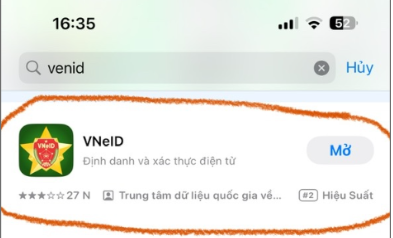
1.1 Vietnamese Nationals
1.1.1 Level 1 Identification
Level 1 identification verifies the basic information of the legal representative or business owner.
- The applicant must provide personal information such as a citizen ID card (CCCD) or other valid personal identification documents.
- Once completed, the user can access online administrative services, register a business, and carry out electronic transactions.
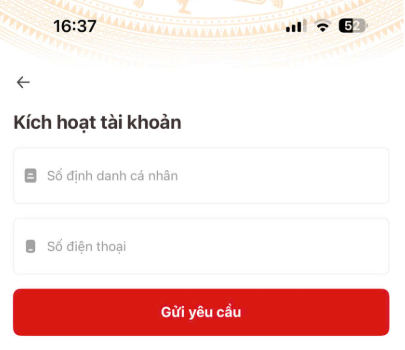
1.1.2 Level 2 Identification (For Vietnamese Nationals)
Level 2 identification is an enhanced verification step that strengthens security and confirms more sensitive information. It typically requires digital signature authentication or verification via banking systems to confirm the business owner’s financial status.
Once verified, the business owner receives an electronic identification account that can be used for administrative transactions and online contract signing.
1.2 Identification for Foreign Nationals
Foreign business owners must submit supporting documents such as their passport or other official identification issued by their home country. Foreign nationals only need a single verification step, based primarily on the passport or valid identification from the home country, together with verification by the competent Vietnamese authorities.
1.2.1 Required Documents
– Application form for an electronic identification account / electronic ID – Form TK01 issued under Decree 69/2024/ND-CP.
– Passport.
– Enterprise Registration Certificate (ERC), email address, and personal phone number.
– Any information the foreign national wishes to integrate into the national identification application.
1.2.2 Procedure
Apply in person at the Immigration Department under the Ministry of Public Security or the provincial police office during working hours (Monday to Friday, excluding public holidays) to submit the application for an electronic identification account.
Step 1: Take a queue ticket for photo registration.
Step 2: Have a portrait photo taken at the reception desk.
Step 3: When your number is called, complete Form TK01, submit the prepared documents, and provide your biometric fingerprints.
Once the system completes verification, the Level 2 identification account details are sent to the applicant via SMS or email.
The procedure typically takes 3 to 7 working days.
Step 2: Organizational Identification on the VNeID App
For full details, see: Identification guide for foreign-invested (FDI) enterprises
Step 3: Authorizing Functions for Employees (If the Head of the Organization Is Not Residing in Vietnam)
To avoid disruption to operations (tax reporting, social insurance, public services, etc.), the organization can grant a power of attorney to another individual residing in Vietnam, such as an employee or an accounting service provider, to act on its behalf for identification registration.
The authorized person must hold a Level 2 VNeID personal account and meet the authentication requirements using a chip-embedded citizen ID card, or a passport / residence card if a foreign national. They are then authorized to handle the procedures on behalf of the Director.
Note:
If the Director signs the power of attorney while abroad, the document must be consular-legalized or notarized in accordance with Vietnamese notarization law.
Option: Changing the legal representative on the Enterprise Registration Certificate (ERC) to a Vietnamese national.
The legal representative is the person who signs key decisions for the company, including organizational identification.
If the Director is changed from a foreign national to a Vietnamese citizen, the organization is changing its legal representative and assumes the related legal responsibilities.
- The new Vietnamese representative will complete the organizational identification on behalf of the foreign national.
- The foreign national no longer needs to perform the organizational identification but remains a shareholder if they retain equity in the company.
Procedure
Step 1: Change the Legal Representative on the Enterprise Registration Certificate
Submit the documents to change the Director / legal representative to the Business Registration Office under the Department of Planning & Investment in the locality where the business is registered.
Required documents:
- Notice of change of legal representative (form provided by the Department).
- Company decision appointing the new legal representative.
- Personal documents of the new legal representative (ID card / CCCD / passport).
Step 2: Organizational Identification
Once the change of representative is approved, proceed with the organizational identification under the new legal representative.
Step 3: Authorization If Needed
If the new legal representative wishes to authorize an accountant or service provider, the authorization process within VNeID should still be followed.
Authorization Process for an Accountant or Support Unit
Step 1: Add an Employee Account to the Organization
1. Open the VNeID application using the Director’s account and go to the “Organizational Identification” section.
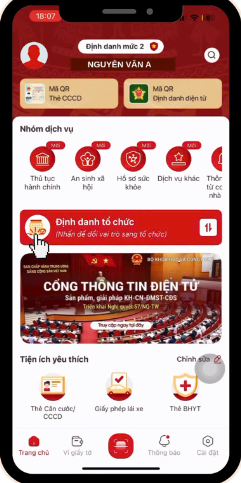
2. Access the organization.
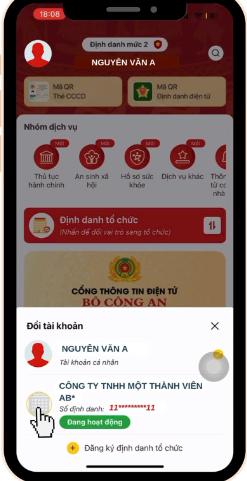
3. Go to the “Add Member” section.
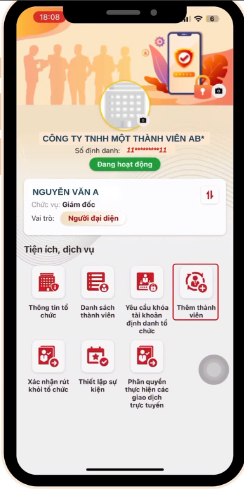
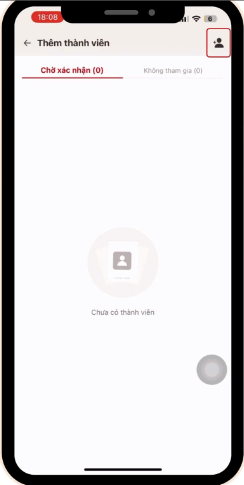
4. Tap the add-member icon at the top right of the screen.
5. Enter the member’s information.
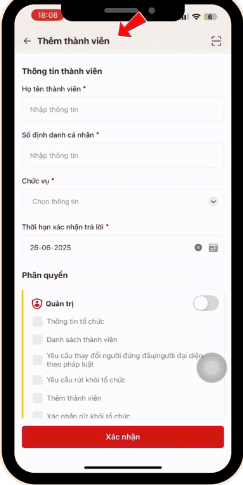
6. Choose the management option:
- Select “Grant access to perform online services.”
- Then select “I confirm adding the member to the organization.”

Step 2: Member Confirms Joining the Organization
1. The member logs in to the VNeID application and opens the “Notifications” section.
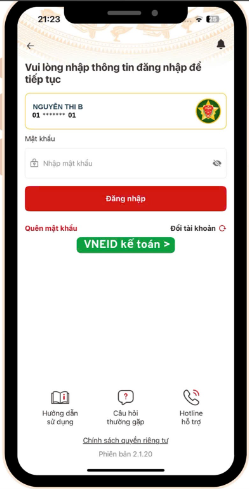
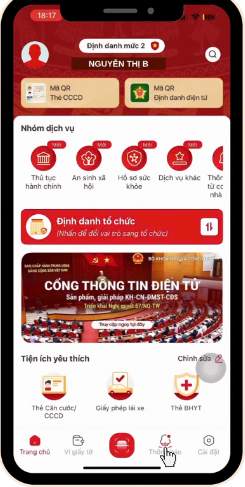
2. Tap the notification “Confirm participation in the organization.”
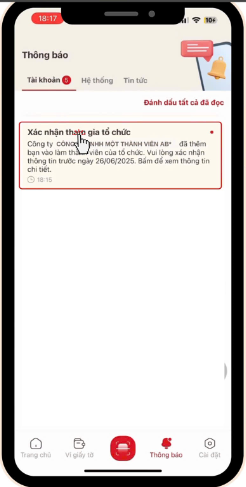
3. Tap the “Confirm” button to join the organization.


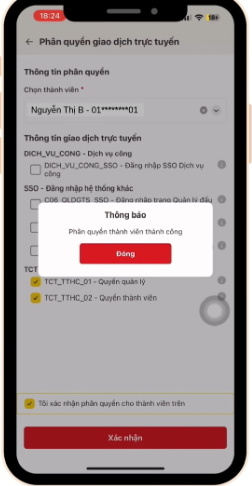
Step 3: Granting Permissions to the Member Account
1. The Director opens the VNeID application.
2. Tap the “Organizational Identification” section and select the organization for which permissions are being granted.

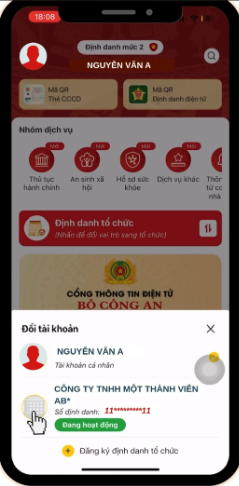
3. Tap “Grant permissions to perform online transactions.”
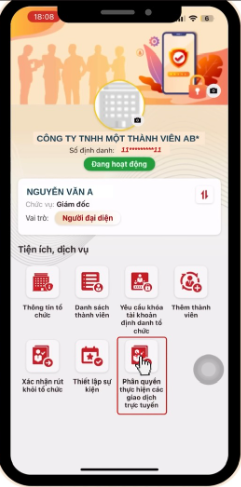
4. Select the member.
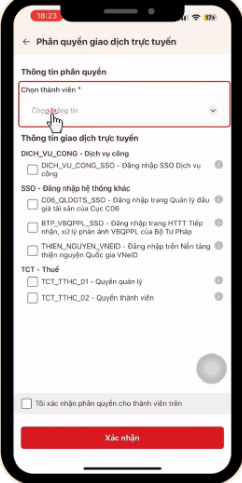
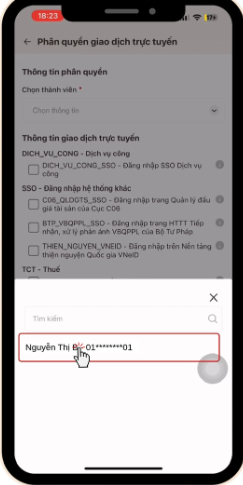
5. Assign permissions to the member, tap “I confirm the permissions,” and confirm.
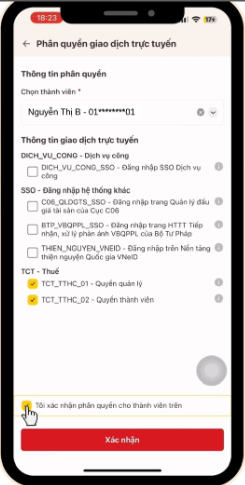
6. Enter the verification code.

Step 4: Log In to the Electronic Tax System
1. The member logs in at thuedientu.gdt.gov.vn, selects “Log in using the electronic identification account,” and then chooses the organization to log in.

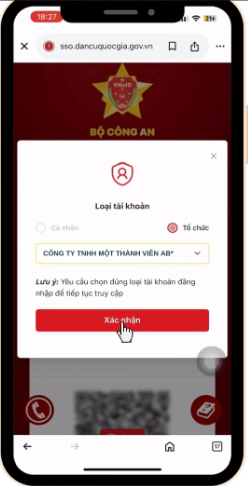
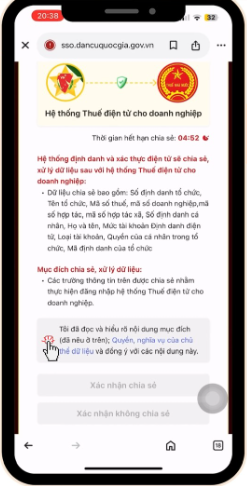
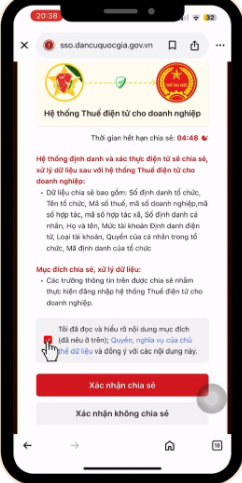
2. Tick the box “I have read and fully understand the purpose,” then confirm to share the information.
Reference link: https://ebh.vn/tin-tuc/dang-ky-chu-ky-so-ca-nhan-tren-vneid
A video tutorial is available to guide you through the process of authorizing functions for members.
Following the steps above ensures your organization complies with the law while streamlining administrative procedures and online transactions. It is an essential foundation for building a transparent and efficient business management system.
In upcoming posts, we will examine each step of the identification process in greater detail, share practical implementation tips, and outline the key points businesses need to be aware of to complete the process quickly and accurately.
For any inquiries, please contact Wacontre Accounting Services via Hotline: (028) 3820 1213 or email [email protected] for prompt assistance. With a team of experienced professionals, Wacontre is committed to providing dedicated and efficient service. (For Japanese clients, please contact Hotline: (050) 5534 5505.)
Click to register now and access the form here.