GUIDE TO PUBLIC SERVICE IMPLEMENTATION
UNDER RESOLUTION 116/NQ-CP
1. Application Submitted by the Employer (for Current Employees)
1.1. IVAN Software
Use the IVAN declaration software to file the public service application: Support for Unemployment Insurance Participants Affected by COVID-19 (Form 600L).
1.2. Vietnam Social Insurance Public Service Portal
Step 1. Log in to the Vietnam Social Insurance Public Service Portal at https://dichvucong.baohiemxahoi.gov.vn using a registered account.
Step 2. Select "Profile Declaration". The screen will display as follows:

Step 3. Choose the public service Support for Unemployment Insurance Participants Affected by COVID-19 (Form 600L):

Step 4. Select "Declaration", then select "Confirm" for the declaration period to open the declaration screen:
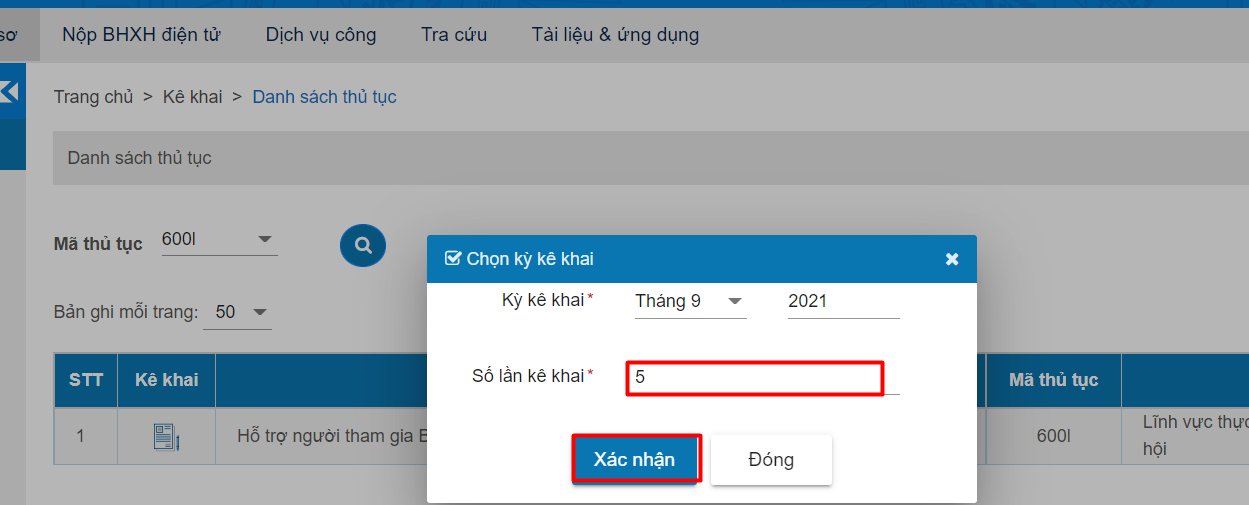
Step 5. Submit Form 01 as shown in the image below and select Confirm:
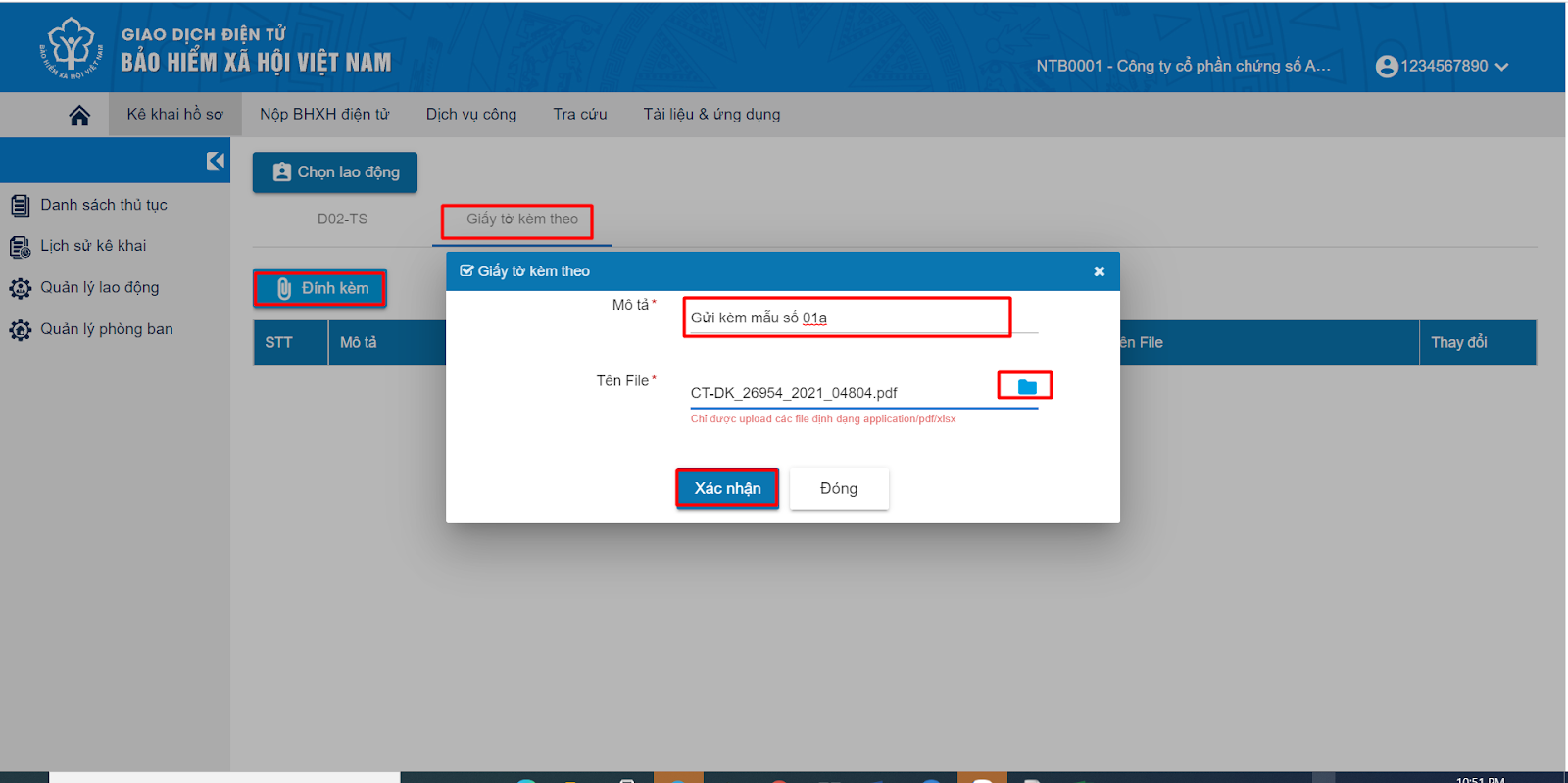
Step 6. Select Declaration.

Step 7. Select Confirm.

Step 8. Sign and submit the application. The screen will prompt you to enter the PIN of your digital certificate:
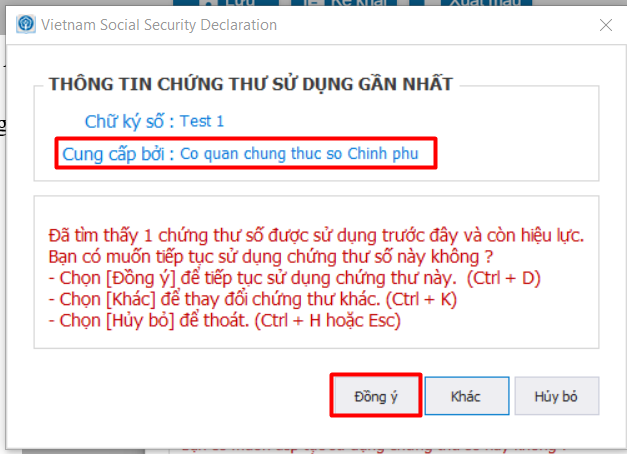

After entering the correct PIN, the system will display a successful submission notification:
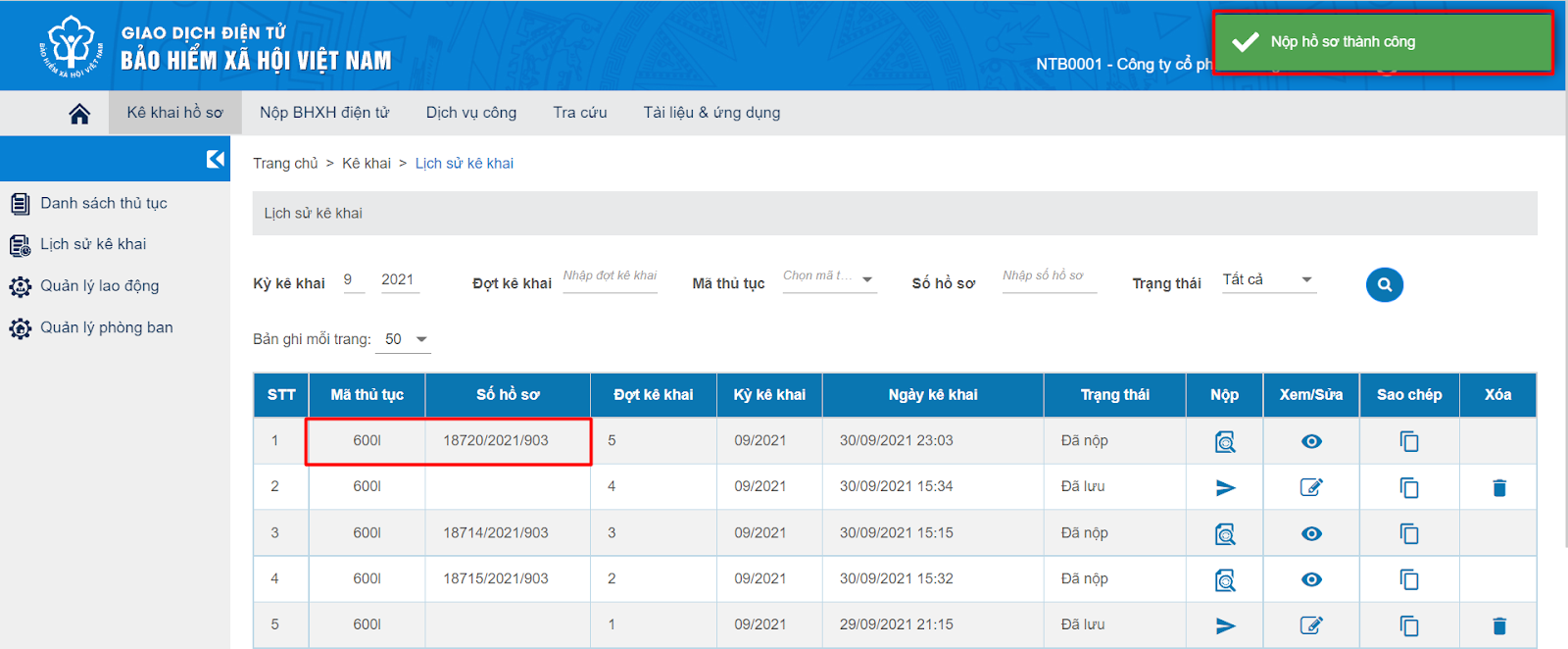
2. Application Submitted by Employees (for Those Who Have Resigned)
2.1. VSSID Application
Step 1. Sign in to the VssID app.
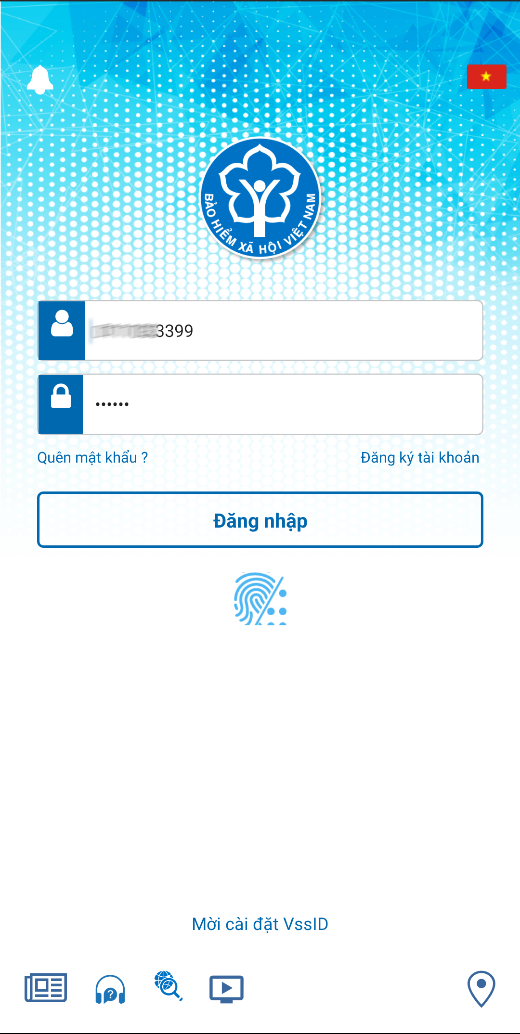
Step 2. Select the Public Service menu.

Step 3. Choose the COVID-19 Support public service under Resolution 116/NQ-CP (Support for Unemployment Insurance Participants Affected by the COVID-19 Pandemic).

Step 4. Verify your unemployment insurance contribution period that has not yet been counted toward unemployment benefits (in months).
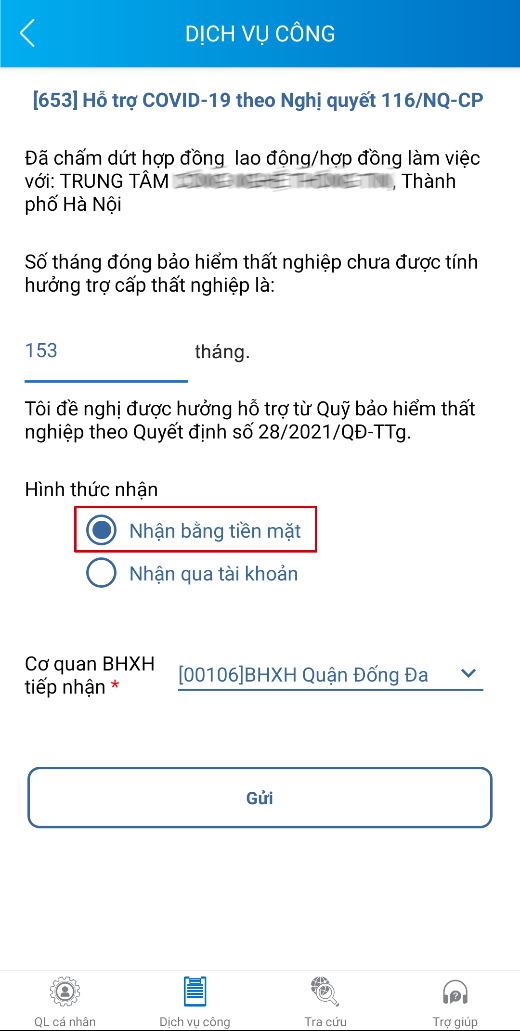
Step 5. Choose your preferred method of receiving support (cash at the social insurance office or bank transfer).
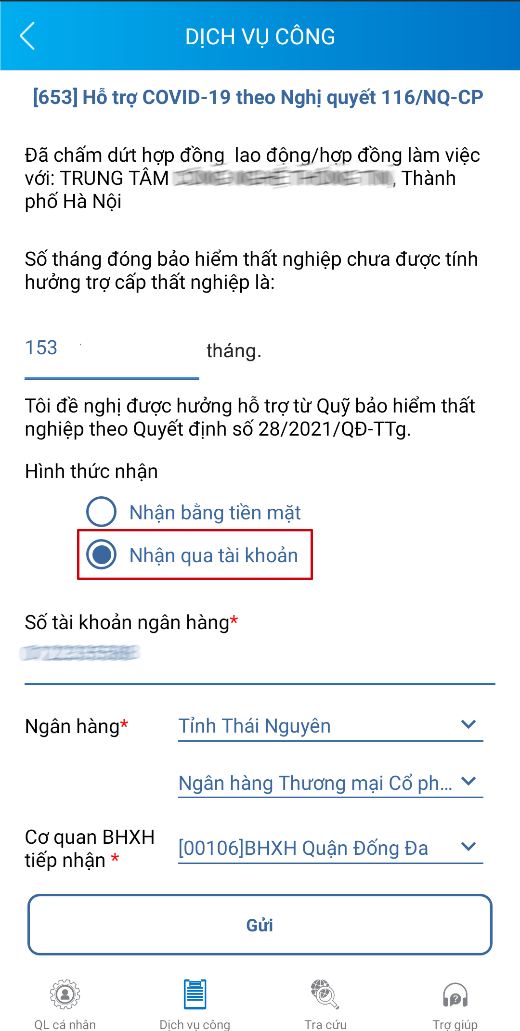
If you choose to receive support via bank transfer, please complete the following information:
– Bank account number of the applicant.
– Select the bank (and bank branch).
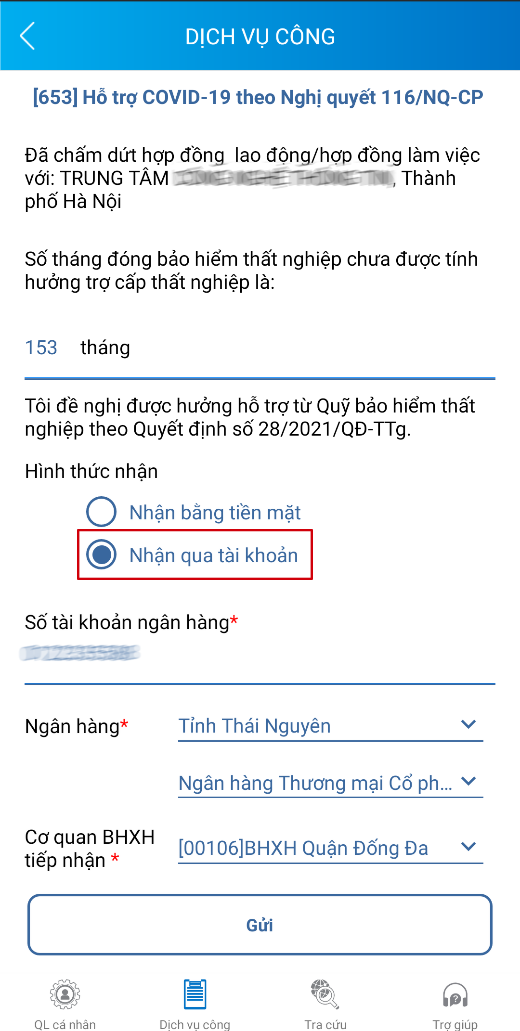
Step 6. Select the receiving agency, then click the Send button.
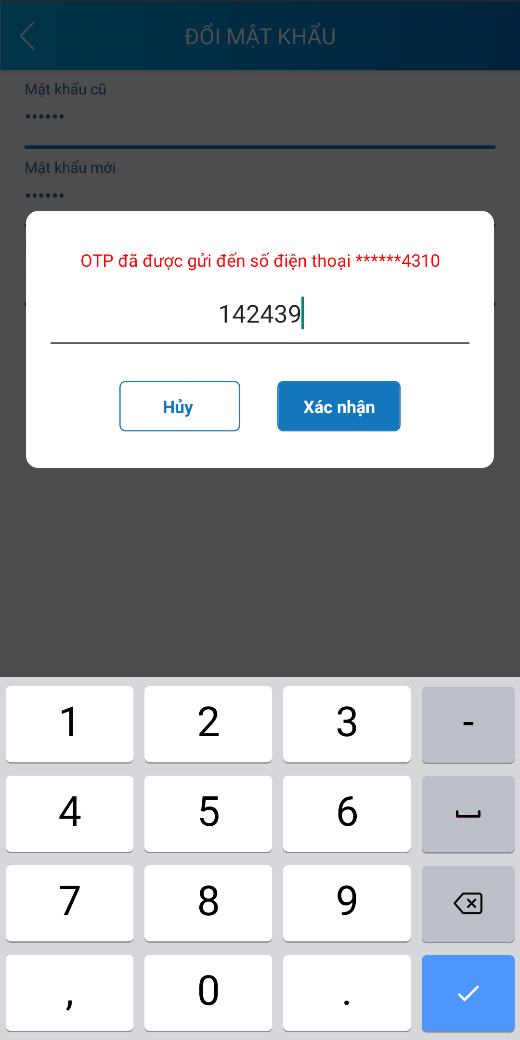
Step 7. Enter the OTP code, then click Confirm to submit your application.
2.2. Vietnam Social Insurance Public Service Portal
Step 1. Log in to the Vietnam Social Insurance Public Service Portal at https://dichvucong.baohiemxahoi.gov.vn using a registered account.
Step 2. Select the "Declaration" section. A list of public services available for declaration will appear as follows:
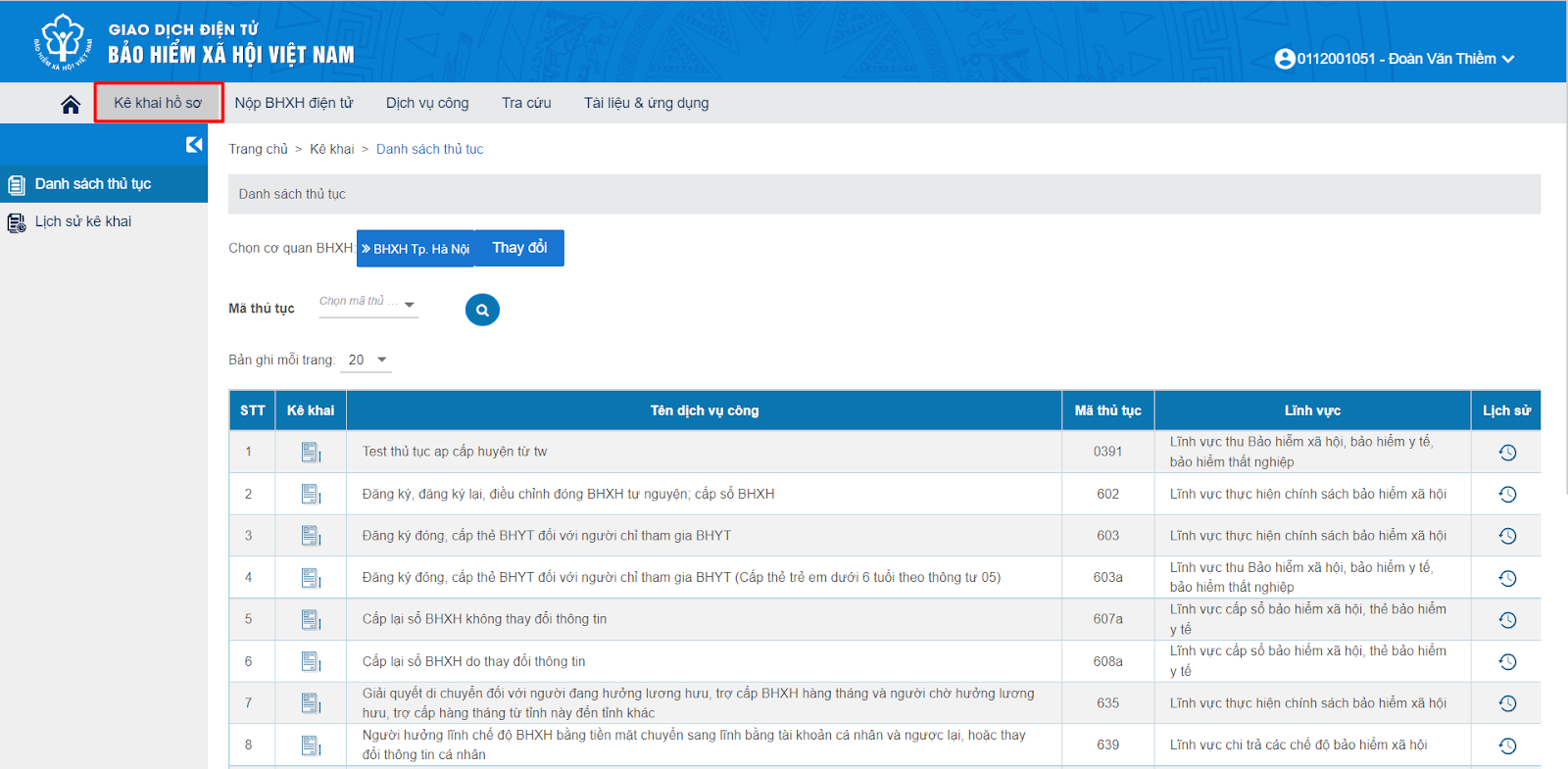
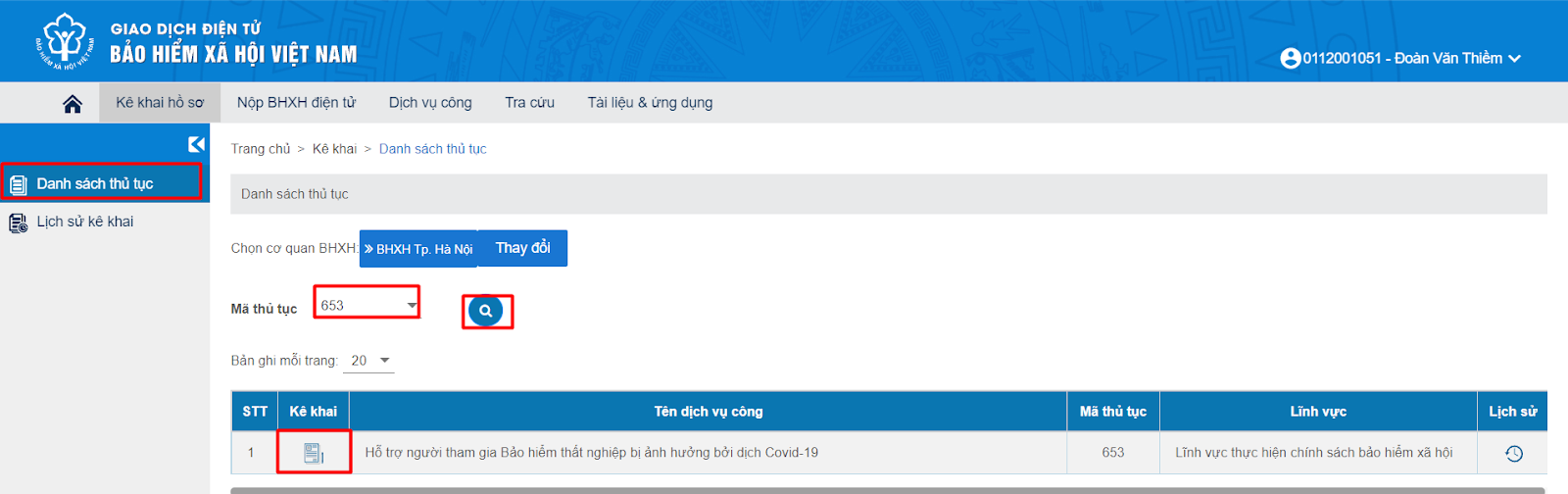
Step 3. On the "List of Procedures" screen, select procedure code 653 – Support for Unemployment Insurance Participants Affected by COVID-19, then select Declaration:
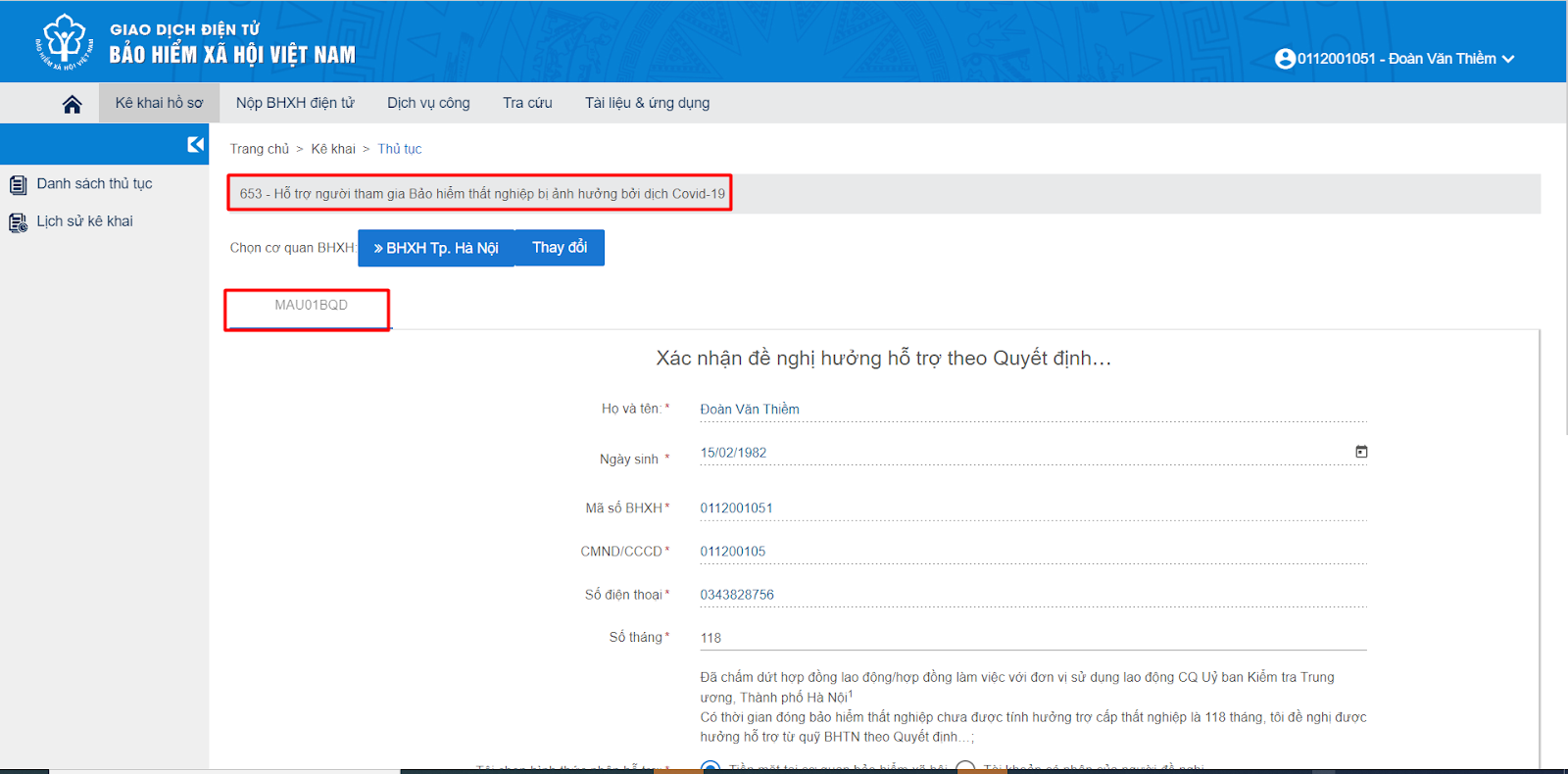
Step 4. Declaration of documents:
Select "Declare". The system will verify the social insurance contribution history for the social insurance number and display the information as follows:
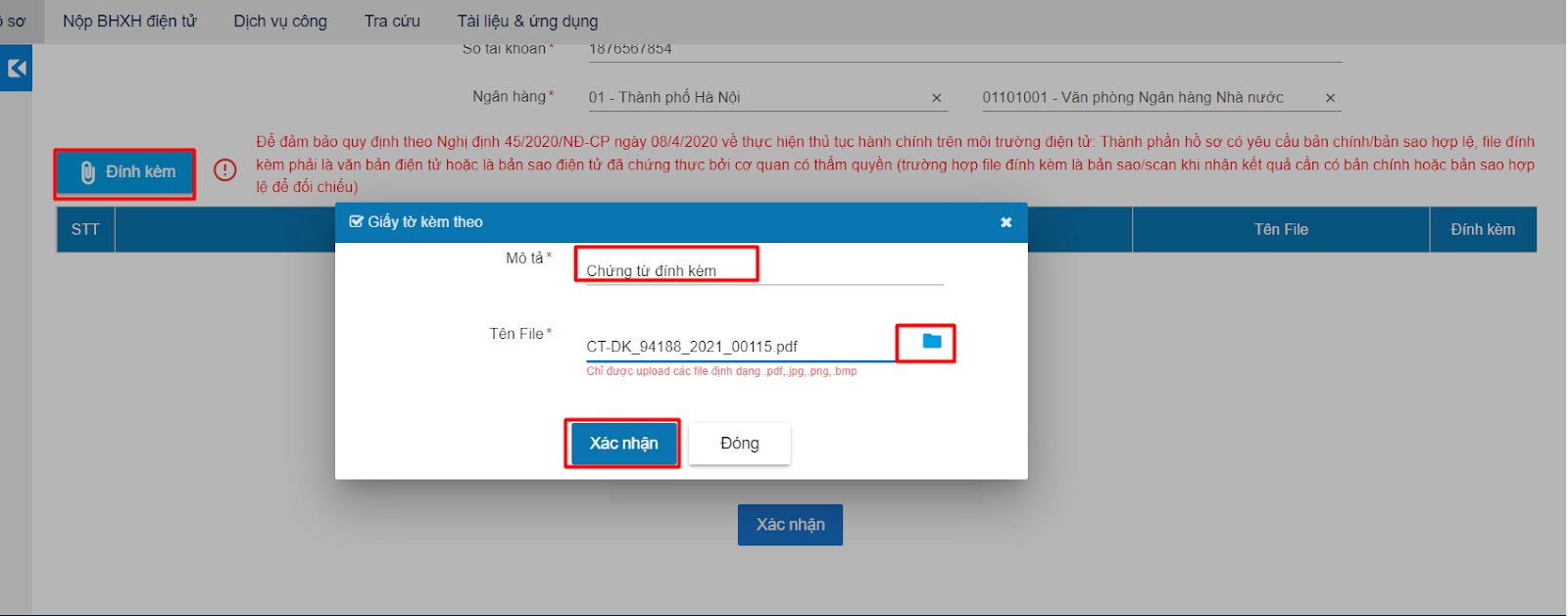
Attach the supporting documents:
Step 5. Submit the application: enter the confirmation code as shown:

Enter the OTP for authentication:

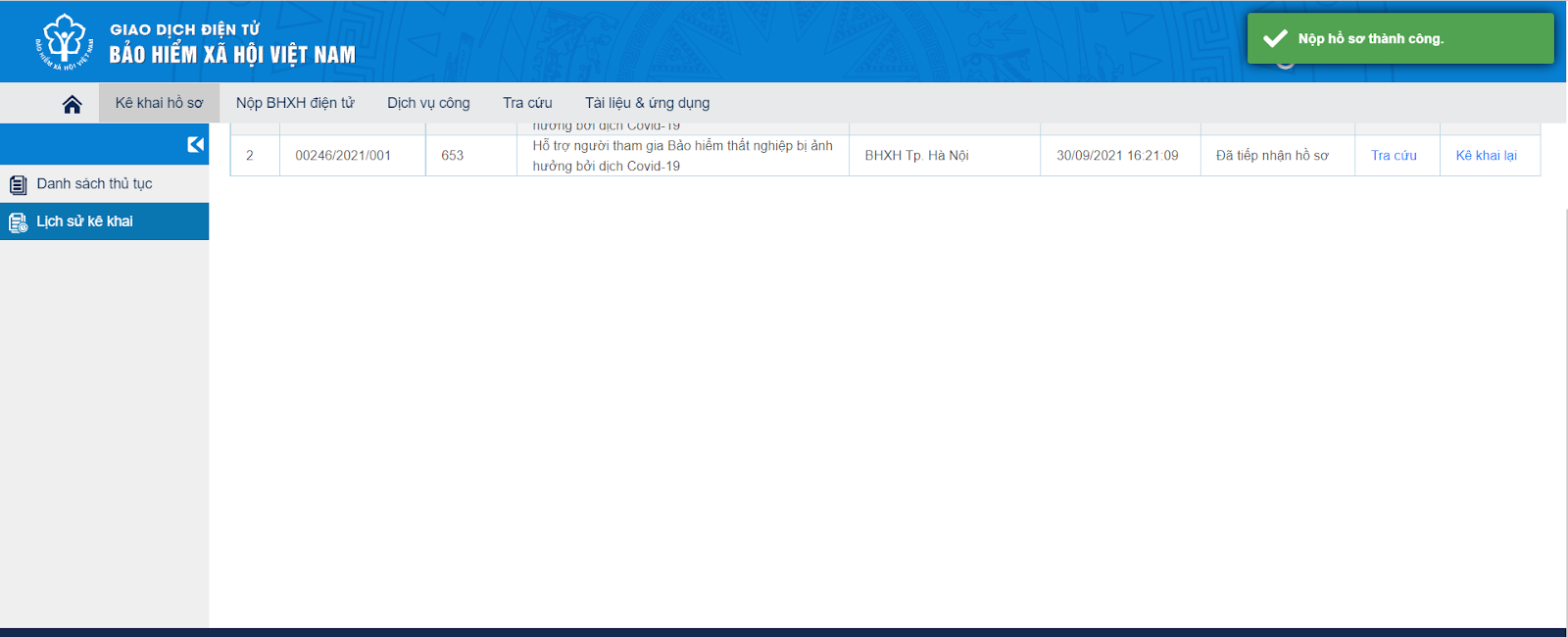
Once authentication is successful, the system will display a submission success notification, confirming that the individual’s application has been sent to the social insurance agency.
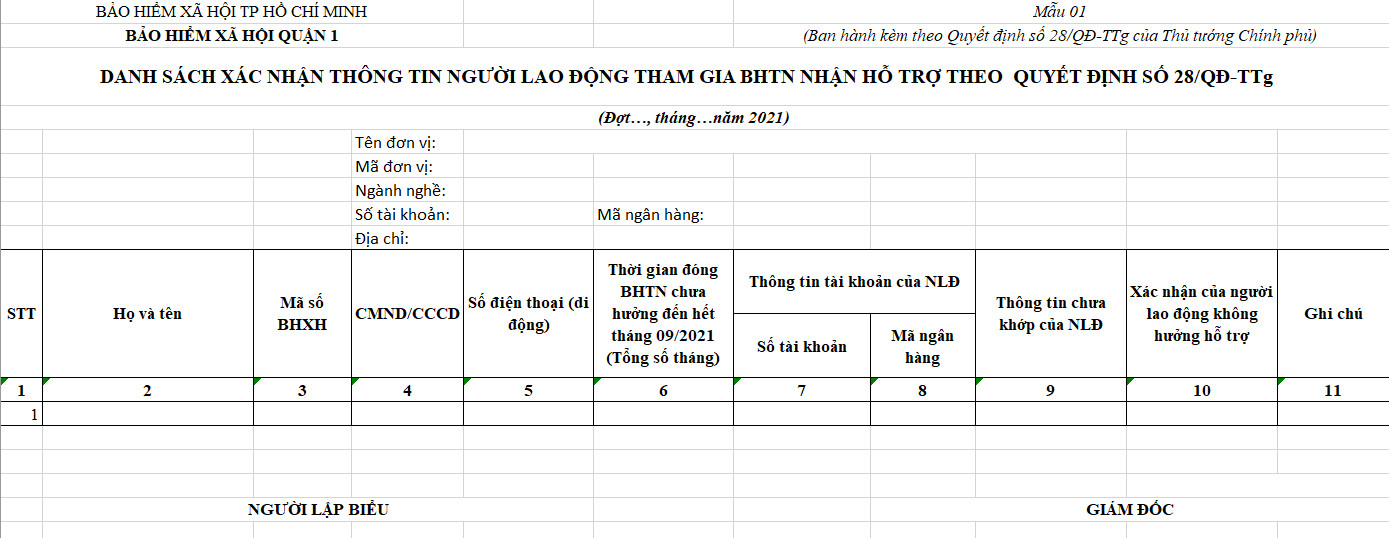
FORM 01A PROCESSING STEPS
- Obtain Form No. 01a from the social insurance agency
The following employees are not required to complete Form No. 02 (600L application) or Form No. 03 (600M application):
- Employees who are not eligible for benefits at the company: those who resigned from September 2021 onward, or who have received retirement benefits from September 30, 2021 or earlier (these may still appear on the Form No. 01a list due to the company’s late reporting of headcount reductions).
- Cases of unfiled reports: KL, TS, OD reports as of 30/09/2021 (including those on the Form No. 01a list) are pending guidance from the Ministry of Labor.
The number of unemployment insurance (UI) months shown on Form 01a includes contributions made elsewhere even without book closure. Months not counted toward social insurance include: any period during which the company owed contributions to the social insurance agency as of September 30, 2021, and late headcount-increase reports filed after September 30, 2021.
The company is responsible for the accuracy of all information on Form No. 02 and Form No. 03. If errors are detected after benefits have been paid, the social insurance agency will recalculate the benefit level based on the redetermined social insurance contribution period, and will either pay the difference or recover any overpayment. The company shall cooperate with the social insurance agency in recovering any incorrect payments made to employees. If the company is unable to recover the overpayment, the company must reimburse the social insurance agency.
- Completing Form No. 02 or Form No. 03
Form No. 02: For employees whose number of unemployment insurance contribution months remains unchanged, or whose actual contribution months differ but do not affect the benefit level.
Enter the bank account information and bank code of the company and employee (with the list attached to Form 01) into Form No. 01a.
Note: Changes from an old ID card to a new Citizen Identification (CCCD) card do not require adjustment (a Form 608 may be filed later, no immediate action needed). For additions, phone number changes, incorrect ID/CCCD numbers, or incorrect names, file Form 608 first. Update the corrected information on Form No. 02 and Form No. 01a. The company may submit in multiple batches.
For electronic 600L applications, attach two Excel files (Forms 02 and 01a). No printing or signed seal is required.
If an employee is on the Form No. 01a list but resigned before September 30, 2021 (due to the company’s late reporting of headcount reduction), they are excluded from Form No. 02. Employees on sick leave or maternity leave as of 30/09/2021 (more than 14 days off in September 2021) are excluded from both Form No. 02 and Form No. 03, pending guidance from the Ministry of Labor.
If the employee notes column indicates multiple social insurance books and the book number listed does not belong to the employee, disregard it. Consolidate the books before completing Form No. 02 or Form No. 03.
If the notes column correctly indicates a retired employee, exclude them from Form 02 or Form No. 03.
If the notes column indicates that the employee has already received unemployment insurance benefits and the number of months on social insurance already reflects the deducted entitlement period, disregard it. If incorrectly deducted, switch to Form No. 03. Each month of UI benefits received corresponds to a deduction of 12 contribution months.
Form No. 03: For employees whose number of social insurance contribution months changes (which affects the benefit level).
Enter the bank account information and bank code of the company and employee (with the list attached to Form 01) into Form No. 01a. Update the corrected information on Form No. 03 and in column 9 of Form No. 01a.
For electronic 600M applications, attach two Excel files (no printing, signing, or sealing required).
If an employee is on the Form No. 01a list but resigned before September 30, 2021 (due to the company’s late reporting of headcount reduction), they are excluded from Form No. 02. Employees on sick leave or maternity leave as of 30/09/2021 (more than 14 days off in September 2021) are excluded from Form No. 03, pending guidance from the Ministry of Labor.
If the employee notes column indicates multiple social insurance books and the book number listed does not belong to the employee, disregard it. Consolidate the books before completing Form No. 03.
If the notes column correctly identifies a retired employee, exclude them from Form No. 03.
How to look up the social insurance contribution history:
Refer to the social insurance book closed by the previous employer, combined with the VssID app (the contribution period shown on the book and in the app should match).
| Noted error | Action (disregard if valid) |
| Has received unemployment insurance benefits | Deduct 12 contribution months for each month of UI benefits received; if already deducted, disregard |
| Has received a one-time social insurance payout | Skip |
| Retired or deceased before **/**/**** | If correctly retired, exclude from Form 02 or Form 03 |
| On maternity (TS) leave | Exclude from Form 02 or Form 03 pending further instructions |
| Missing ID card / CCCD number | File Form 608 to add the ID card / CCCD number |
| Same name and date of birth already exists in the database under social insurance code: ******** | The employer should verify: – If the book number ********** belongs to the employee, file Form 621. After consolidating books, file Form 600M. If it does not belong to the employee, file Form 600L. |
| Same ID/CCCD number already exists in the database under social insurance code: ********* | |
| Same phone number already exists in the database under social insurance code: *********** | If the phone number is incorrect, file Form 608. If correct, disregard, as there is no conflict. – If book number ********* belongs to the employee, file Form 621. After consolidating books, file Form 600M. If book number ********** does not belong to the employee, file Form 600L. |